Retool vs Custom Code: When to Use What
Sam Okpara
September 2025
Your engineering team needs five new internal tools by Q3. Someone suggests Retool. Someone else argues for building in React. A third person floats a hybrid approach but can't articulate when to use which. The meeting ends with no decision.
This plays out constantly at companies scaling their internal tooling. The choice between low-code platforms and custom code feels binary, but it should not be. Each approach has a specific sweet spot, and using the wrong one wastes months.
Here is a framework for making the call, drawn from building over a dozen internal tools across engagements with a major communications platform and a global QSR brand.
Where Retool wins outright
Retool excels at a specific class of problem: structured data in, human decisions out. If the core workflow is reading records, filtering tables, running queries, and writing data back, Retool collapses weeks of development into days.
For a franchise analytics portal built for a global quick-service restaurant chain, Retool was the right call. The requirements were straightforward: pull operational data from existing systems, present it in filterable dashboards, and let franchise operators drill into location-level metrics. No exotic UI patterns. No complex state machines. Just data surfaced for decision-making.
What shipped in days would have taken weeks with a custom React app after factoring in component libraries, authentication, query layers, and deployment infrastructure.
Retool's underappreciated strengths:
- Permissions and audit logging are built in. You skip the two-sprint detour of implementing RBAC from scratch.
- Database and API connectors work out of the box. Postgres, REST, GraphQL, Snowflake -- plug in and start querying.
- Deployment is instant. No CI pipeline, no infrastructure provisioning. Your ops team gets the tool the same day it is built.
- Maintenance burden is low. Security patches, component updates, and hosting are handled by the platform.
For internal tools where speed-to-delivery matters more than pixel-perfect UI, Retool is hard to beat.
Where Retool hits a wall
Not everything is a table-and-form problem.
During an engagement building internal tools for a large communications platform's Trust and Safety team, several tools required complex, stateful interactions. One involved bulk moderation actions across millions of users with real-time feedback, custom visualization of behavior patterns, and deep integration with ML training pipelines. That is not a Retool problem. That is a "you need a real application" problem.
Custom code makes more sense when:
- Complex state management is required. Multi-step workflows with branching logic, undo/redo, or optimistic updates fight Retool's state model instead of leveraging it.
- Custom visualization is central. Retool's chart components cover standard bar-and-line use cases. Force-directed network diagrams, canvas-based rendering, or anything requiring D3 means writing custom components anyway -- at which point Retool adds overhead rather than removing it.
- Performance at scale matters. When operators need to scan and act on datasets with millions of rows, virtual scrolling, lazy loading, and tight render control are necessary. Retool's abstractions get in the way.
- The tool is brand-facing. External partner portals or customer-facing dashboards need full design control. Retool apps look like Retool apps, which is fine internally but less appropriate when representing your brand.
The hybrid approach
The most effective pattern for companies with more than two or three internal tools is using both. This is not a compromise -- it is an optimization.
Across a twelve-tool engagement for the communications platform, the split was roughly half and half. Pure Retool handled admin panels, data review interfaces, and configuration dashboards. These shipped fast, and operators could request changes that went live within hours.
The other half were custom React applications: the bulk action system, the ML pipeline interface, and the real-time monitoring dashboard. These needed custom backends, WebSocket connections, and UI patterns Retool does not support.
The two categories are usually obvious if you ask the right questions upfront.
Decision matrix
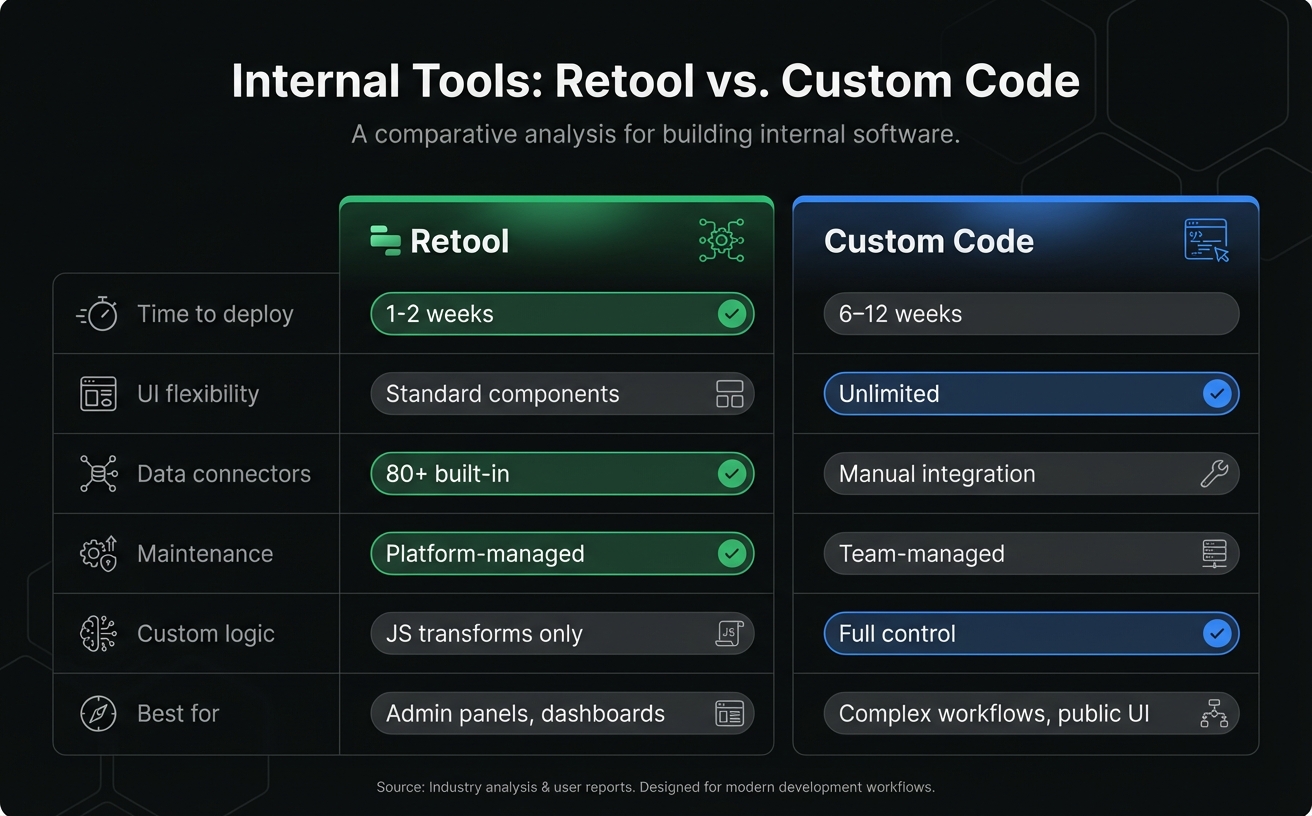
| Factor | Retool | Custom Code |
|---|---|---|
| Core interaction | CRUD on structured data | Complex workflows, real-time data |
| User base | Internal ops, support, admin | External users or brand-facing |
| Time to delivery | Days to weeks | Weeks to months |
| Data sources | Existing APIs or databases | Custom backends, WebSockets |
| UI requirements | Standard tables, forms, charts | Custom visualizations, novel patterns |
| Dataset scale | Moderate (thousands of rows) | Large (millions of rows, virtual scroll) |
| Maintenance burden | Low (platform-managed) | Higher (team-managed) |
| Per-user cost at scale | Grows with seats | Fixed hosting cost |
The cost calculation most teams skip
Retool's pricing is per-user. For a ten-person ops team, it is very reasonable. For hundreds of users across departments, the math changes.
There are engagements where Retool licensing over two years exceeds the cost of building and hosting a custom app. But the reverse is also true: custom apps carry ongoing maintenance costs that are easy to underestimate. Retool handles infrastructure, security patches, and component updates.
Run the numbers on a three-year horizon, not just the first quarter. Factor in developer time for maintenance on the custom side, and seat growth on the Retool side.
When not to use either
Some internal tool needs are better served by neither Retool nor custom code:
- Spreadsheet-level complexity: If the tool is essentially a shared spreadsheet with light logic, consider Airtable or Google Sheets with Apps Script. Over-engineering internal tools is a real failure mode.
- One-off scripts: If the "tool" is a script that runs once a week, a CLI tool or a cron job is simpler and cheaper than either option.
- Off-the-shelf solutions: Before building anything, check whether an existing SaaS product solves 80% of the problem. Custom internal tools should fill gaps, not replicate commodity software.
The takeaway
The worst internal tools are built with the wrong approach: custom React apps that should have been Retool dashboards because an engineer wanted a resume project, or Retool apps straining under requirements they were never designed for because someone promised "no-code" to a VP.
Pick the tool that fits the problem. For most companies building more than a few internal tools, the answer is both -- Retool for the straightforward CRUD interfaces, custom code for the complex stuff, and a clear framework for deciding which is which before the first line of code is written.
If your team is evaluating internal tooling options and wants an honest assessment of what fits, reach out to Paramint. We are a Retool Preferred Partner, and we still build half our tools in React. That should tell you something about how we think about this.
Need help building something like this?
At Paramint, we build production AI systems, custom software, and internal tools for growth-stage startups, enterprises, and government agencies. We focus on solutions that deliver measurable impact — not just demos.
Get in touch